

Create a Branch
You can create a branch off of your stack's main (default) branch. The child branch you create inherits all of the content types, entries, assets, languages, extensions, releases, etc. that were part of the main branch as it is.
Note: Only stack owners, admins, and developers can create a new branch.
Both developers and content managers can make changes to different copies (branches) of the same stack content in isolation.
When you create a branch, you can also choose which environments to clone into it — all environments, none, or a specific set that you select. All other data, such as content types, entries, assets, and languages, is inherited from the source branch as before. Cloning only the environments a branch needs keeps branch creation fast and avoids cloning every environment by default. Environments you don't select aren't cloned, so the new branch starts without the source branch's published content for them. Those environments still exist at the stack level, so you can publish to them from the new branch later.
Additional Resource: For all child branches created subsequently, you can select any other branch apart from main to act as source branch.
To create a branch, log in to your Contentstack account, go to your stack, and perform the following steps:
- Click the “Settings” icon, and select Branches.
Note: The main branch is the default branch for any stack.
- Click on + New Branch.
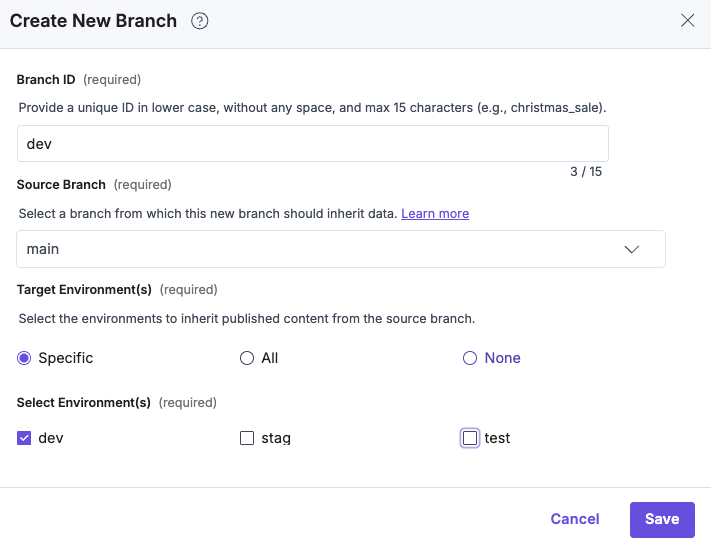
- The Create New Branch form appears for you to add the following details:
- Branch ID: Enter a unique ID for the branch, such as “staging” or “development”.
- Source Branch: Select a branch from the dropdown from which this new branch should inherit data.
- Target Environment(s): Choose which environments to clone into this branch:
- Specific (default): Under Select Environment(s), select one or more environments to clone. You must select at least one environment.
- All: Clone all environments from the source branch.
- None: Clone no environments.
Note:
- By default, the main branch is the source branch for the first child branch you create.
- Specific is the default option, so you make a deliberate choice about which environments to clone. When Specific is chosen, the Save button stays disabled until you select at least one environment. Choosing All or None enables the Save button immediately.
- Finally, click Create to save your branch.
Note: At a time only one branch can be created across an organization. The creation actions triggered for any other branches remain in the “in-queue” state until the current branch creation action is completed. You can view the status of these actions within the organization's bulk task queue.
API Reference
To perform operations related to Branches within your stack via API, refer to the Branches collection in our Content Management API documentation.
