

Add API Endpoints to a Website in Launch
Launch allows you to write Cloud Functions to create API endpoints.
This step-by-step guide lets you add API endpoints to a website in Launch.
Prerequisites
- Contentstack account
- Launch-enabled Organization
What You Will Learn
How to write a Cloud Function that exposes an API endpoint.
How to package and deploy the function on Launch.
How to call the deployed API endpoint and read its response.
Steps for Execution
Follow the steps given below to write a Cloud Function that can be used to add API endpoints to a website in Launch.
- Create a folder named /functions under a source folder in your project’s root folder.
- Create a JavaScript file to code your functions and then save the file to the /functions folder.
Example:
// functions/users.js export default function handler(request, response) { const users = [ {name: "Jack", age: "25"}, {name: "Rick", age: "28"}, {name: "Jane", age: "34"}, ]; response.status(200).send(users); } - Zip the source folder that contains the /functions folder.
- Deploy your project in Launch using one of the following methods:After successful deployment, you will see the Cloud Functions displayed in the log:
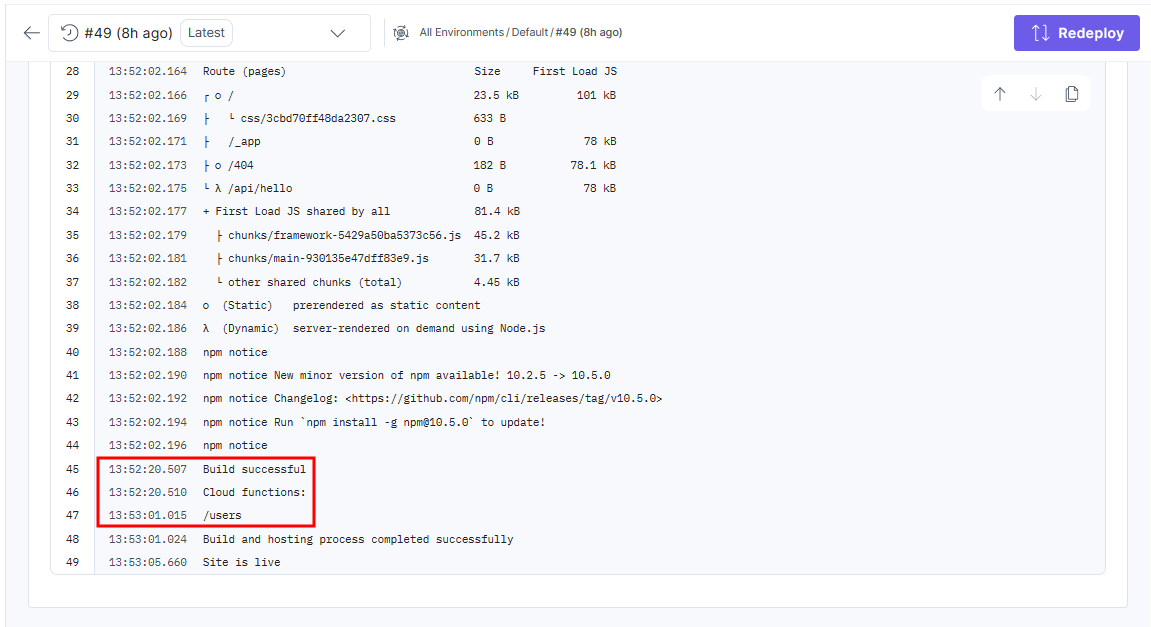 The function endpoint is determined by its file path relative to /functions. The function runs when you visit the path: /users.
 - Click the icon next to the URL in the Domains section to open the deployed website.
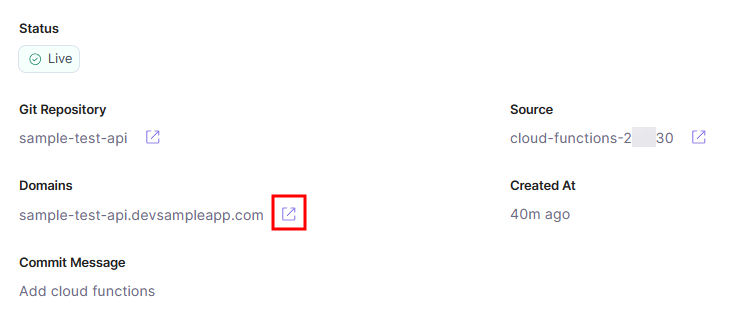 In this example, the URL of the API endpoint will be https://sample-test-api.devsampleapp.com/users.
 - On sending a request to the API Endpoint, you will see the following response:
 [
    {
      "name": "Jack",
      "age": "25"
    },
    {
      "name": "Rick",
      "age": "28"
    },
    {
      "name": "Jane",
      "age": "34"
    }
 ]
Was this article helpful?
More articles in "Launch How to Guides"
